i need to keep track of these, eventually i'll code something for them.
# SNAP TOOLS
- can't change snap type while for example a vertex is being dragged around.
- can't snap to empties, as a snap option.
- while editing a curve you can't select segments (as you would edges)
- can't snap to spline knots/handles/points, would be handy for aligning curves
# MISC UI
- [DONE] can't add empty to the scene while in edit mode. (empty could easily be added outside the current object, at least it could appear that way)
- can't permanently hide palette menus, without modifying the ui scripts each time.
- can't move colourpicker popup out of the way, once it gets in the way.
- newly created primitives instantly lose their parametric access once they are grabbed with G or scaled with S. (this can be a pit of a pain, if none of the operations on that primitive changed the relative shape)
- newly created directories in the filebrowser should retain focus/highlight so a keyboard Enter can go into them and subsequent qwerty strokes can create a filename.
# OUTLINER / GROUPS
- right-click inside groups should allow creation of new group
- should be able to drag objects from group to group within and between (multiple) Outliner Views
- should have an 'ungrouped' outliner option.
- would be cool to have an ability to lock specific items from being unhidden/selectable/renderable.
Wednesday, 30 March 2011

Friday, 25 March 2011
bio 1
bio 1.
My first intro to 3d was probably some faux 3d game like stunt-driver4d which allowed the player to combine elements of track to form new courses. And the original Wolfenstein, which sucked me in quite deep (aardvark anyone?). Then there was the original doom and the ability to make custom maps, which really took on with Quake 2 and 3(for me). At that time i was learning GCode for CNC and Architectural AutoCAD and i think the combination of serious realworld 3d and game 3d made something pop in my brain.
My first intro to 3d was probably some faux 3d game like stunt-driver4d which allowed the player to combine elements of track to form new courses. And the original Wolfenstein, which sucked me in quite deep (aardvark anyone?). Then there was the original doom and the ability to make custom maps, which really took on with Quake 2 and 3(for me). At that time i was learning GCode for CNC and Architectural AutoCAD and i think the combination of serious realworld 3d and game 3d made something pop in my brain.
Saturday, 26 February 2011
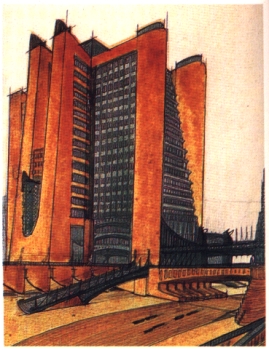
Antonio Sant'Elia la Citta Nouva
another attempt at geometry from photo-reference, this time the reference is a rather quick sketch with conflicting perspective (especially noticeable in the bridge area)

original can be found here : http://chimera.roma1.infn.it/GIORGIO/futurismo/elia.jpg (not sure if this is the correct horizontal orientation, because the largest scan i found to reference online was flipped)

original can be found here : http://chimera.roma1.infn.it/GIORGIO/futurismo/elia.jpg (not sure if this is the correct horizontal orientation, because the largest scan i found to reference online was flipped)
Friday, 25 February 2011
2011 reproduction of "la citta nuova"


these are tentative re-projection tests (7 hours on this one), to feed my fascination with the futurist architecture of Antonio Sant'Elia (1888 - 1916) yep, pretty young.
Saturday, 19 February 2011

Tuesday, 15 February 2011

36h work 110K verts.
working from the blueprints of halflife II concept art found here
never version :

Wednesday, 29 December 2010
blender 2.5 python short layer selection code
def selectLayer(layernum):
    bools = []
    for i in range(20):
        if layernum == i:
            bools.append(True)
        else:
            bools.append(False)
    return tuple(bools) #does a typecast from list to tuple

# because selectLayer returns a tuple
print(selectLayer(4))

# you can stick that into the ridiculously long line like
bpy.ops.curve.primitive_nurbs_path_add( view_align=False,
enter_editmode=False, location=(0, 0, 0),
rotation=(0, 0, 0),
layers=(True, False, False, False, False, False, False, False, False, False, False, False, False, False, False, False, False, False, False, False))

# write instead, if you really need to select a layer
bpy.ops.curve.primitive_nurbs_path_add(layers=selectLayer(0))
Everything dropped from the first primitive_nurbs_path_add() is default/optional anyway. The benefit of making a function for selectLayer is that you can reuse it in other places and you have abstracted away the layers that are of no interest.
layer selection can be even shorter tho, if you only ever want the first layer.
bpy.ops.curve.primitive_nurbs_path_add(layers=((True,)+(False,)*19)))
but wait! there is an even more elegant way using List Comprehension! Instead of earlier defined selectLayer function, this one works the same!
def selectLayer(layer_nr):
    return tuple(i == layer_nr for i in range(0, 20))
the output would look like
>>> print(selectLayer(2))
>>>
(False, False, True, False, False, False, False, False, False, False, False, False, False, False, False, False, False, False, False, False)
Subscribe to:
Posts (Atom)